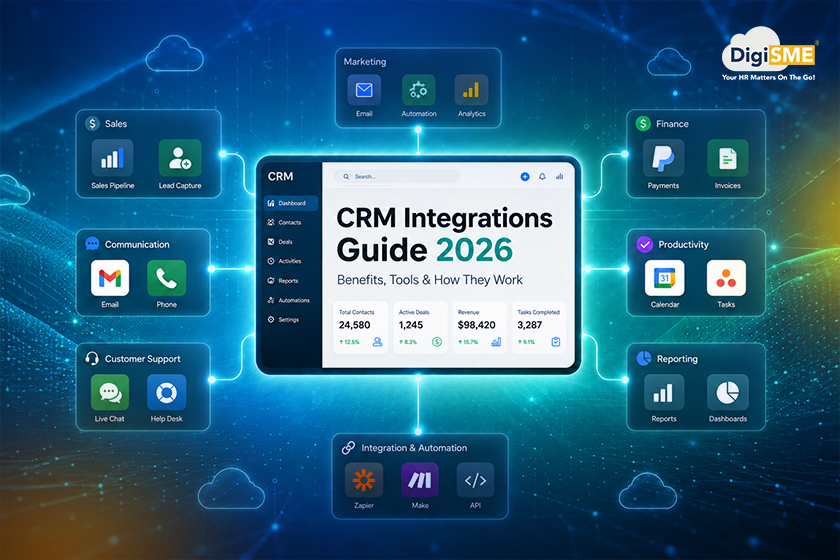
Using multiple business tools without proper integration often creates more confusion than efficiency. As a result, customer details stay scattered across different platforms, sales teams manually update records, marketing data gets disconnected, and important follow-ups are easily missed. Moreover, as businesses grow, managing these disconnected systems becomes one of the biggest operational challenges, especially for teams handling sales, support, finance, and communication together.
For example, missed follow-ups, duplicate customer data, disconnected apps, and constant switching between tools still slow down many businesses today. While sales teams use one platform and marketing teams use another, finance teams often work somewhere else entirely. Consequently, as businesses expand, managing these disconnected systems without proper CRM integrations often leads to delays, increased manual work, and poor customer experiences.
Modern businesses are now moving toward connected and automated workflows where all tools work together in one ecosystem. In fact, recent CRM reports show that businesses earn an average return of $8.71 for every $1 invested in CRM systems, while 91% of companies with more than 10 employees now use CRM platforms. In this blog, we’ll explore what CRM integrations are, how they work, their benefits, key integration types, future trends, and how businesses can build smarter connected workflows in 2026.

Table of Contents
- 1. What Is CRM Integration and How Does It Work?
- 2. Why CRM Integrations Are Important for Businesses?
- 3. How CRM Integrations Improve Different Business Departments?
- 4. Top 5 CRM Integrations for Small Business Automation
- 5. Future Trends in CRM Integrations (2026 and beyond)
- 6. CRM Integration Frequently Asked Questions
What Is CRM Integration and How Does It Work?
CRM integrations simply mean connecting your CRM system with other business tools so that data can move automatically between them without manual effort. As a result, instead of working in isolation, your CRM becomes the central system where all customer and business information comes together in one place.
In simple terms, when your tools are integrated, your CRM stops being just a database and becomes an active system that updates itself in real time. For instance, when a lead fills out a form, books a demo, or makes a payment, that information automatically flows into your CRM without anyone entering it manually. Most modern businesses use CRM integration software to connect tools like email platforms, marketing systems, accounting software, and support tools. These CRM software integrations usually work through APIs, plugins, or pre-built connectors, which help different systems communicate smoothly.
This is how a typical workflow works:
- A customer interacts with your website or ad
- The data is captured by a marketing tool.
- It automatically syncs with your CRM system.
- The CRM triggers follow-ups, tasks, or notifications
- Sales or support teams act instantly with updated data
This is the foundation of modern CRM automation, where manual work is reduced and processes run on their own. Platforms like DigiSME CRM also follow this approach by building an integrated CRM platform that connects sales, communication, and business operations in one system, helping teams avoid tool switching and data gaps.
Why CRM Integrations Are Important for Businesses?
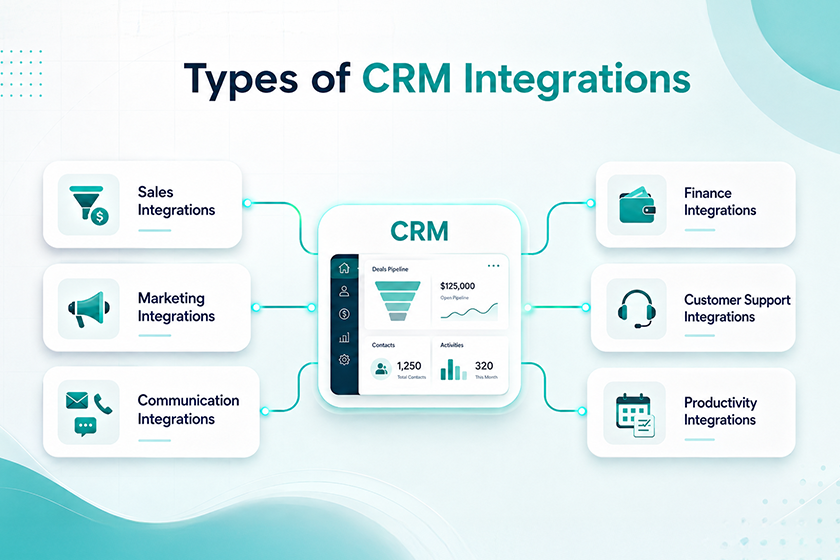
Businesses today use multiple tools to manage customers, sales, marketing, finance, and support. Without proper connectivity, these tools often work in isolation, leading to delays, confusion, and missed opportunities. This is where CRM integrations become essential for building a smooth and scalable business system.
1. Eliminates Data Silos Across Teams
One of the biggest challenges businesses face is scattered data. Sales teams store leads in one system, marketing teams track campaigns in another, and support teams manage tickets separately. With CRM software integrations, all this data flows into a single system. This helps teams access the same updated customer information anytime, improving coordination and decision-making.
2. Improves Sales Efficiency and Lead Management
Speed matters in sales. If a lead response is delayed, chances of conversion drop significantly. With Sales CRM software connected to other tools, leads from websites, ads, and forms automatically enter the CRM. Sales teams can:
- Respond faster to new leads
- Track follow-ups easily
- View complete customer history
- Reduce manual entry work
This is one of the main reasons businesses invest in CRM automation today.
3. Reduces Manual Work Through Automation
Manually updating customer records across multiple platforms takes time and increases the chance of errors. With CRM workflow automation, businesses can:
- Auto-assign leads to sales reps
- Send instant follow-up emails
- Update deal stages automatically
- Sync customer data across tools
This allows teams to focus more on selling and less on repetitive work.
4. Improves Customer Experience
Customers expect quick responses and personalized communication. When systems are disconnected, businesses often respond slowly or with incomplete information. With integrated CRM systems, teams can see:
- Past interactions
- Purchase history
- Support conversations
- Payment details
This helps businesses provide faster and more personalized service, improving customer satisfaction.
5. Helps Businesses Scale Easily
As businesses grow, managing multiple tools becomes more complex. Without integration, scaling operations often means hiring more people just for data management. A connected, integrated CRM platform like DigiSME CRM helps businesses scale by:
- Centralizing operations
- Reducing operational complexity
- Connecting multiple departments
- Supporting business tool integrations as the company grows
6. Better Reporting and Business Insights
When data is spread across tools, reporting becomes inaccurate and time-consuming. With CRM integration software, businesses can generate unified reports that combine sales, marketing, and customer data. This helps in:
- Better forecasting
- Smarter decision-making
- Tracking team performance
- Understanding customer behavior
7. Essential for Modern Cloud-Based Businesses
Most companies today use cloud CRM software because it allows real-time access from anywhere. When combined with integrations, it becomes even more powerful. Businesses using CRM software in India and globally are now shifting toward fully connected systems where all tools work together instead of separately.
How CRM Integrations Improve Different Business Departments?
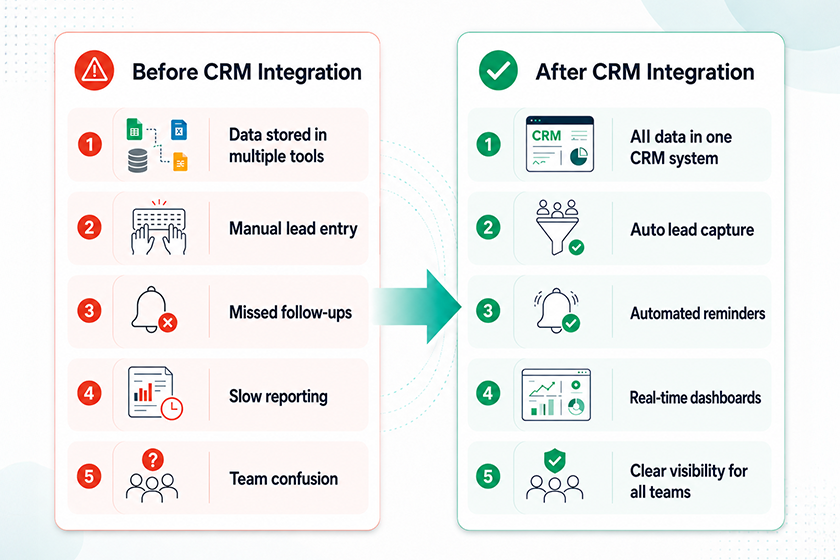
When businesses adopt CRM integrations, the biggest change is not just in software—it’s in how every department works together. Instead of isolated teams and scattered data, everything becomes connected through a single system. In fact, studies show that CRM systems can increase sales productivity by up to 34% and improve forecast accuracy by 42% when properly integrated across business functions. This is because teams no longer work with outdated or incomplete information.
Let’s understand how different departments benefit from CRM software integrations.
1. Sales Team: Faster Leads, Better Conversions
Sales teams benefit the most from Sales CRM software connected with other business tools.
With integrations, they can:
- Get instant access to new leads
- Track customer interactions in one place
- See payment and deal status in real time
- Automate follow-ups and reminders
This reduces response time and helps close deals faster using CRM automation.
2. Marketing Team: Smarter Campaigns and Lead Tracking
Marketing teams rely heavily on data, and integrations make that data more powerful.
With CRM workflow automation, marketing teams can:
- Track campaign performance in real time
- Automatically sync leads into CRM
- Segment customers based on behavior
- Run personalized email campaigns
This improves ROI and helps businesses focus only on high-quality leads.
3. Customer Support: Faster and More Personalized Help
Support teams often struggle when they don’t have the full customer context.
With integrated CRM systems, support agents can instantly see:
- Purchase history
- Previous complaints
- Communication records
- Open tickets
This leads to faster resolution and better customer satisfaction.
4. Finance Team: Accurate Billing and Payment Tracking
Finance teams benefit when CRM connects with accounting and payment systems.
With CRM API integrations, they can:
- Auto-generate invoices
- Track payment status in real time
- Reduce manual accounting errors
- Sync financial data across systems
This improves accuracy and reduces delays in financial operations.
5. HR & Operations: Better Internal Coordination
Modern businesses like DigiSME are also connecting HR and operations with CRM systems to create a unified workflow.
With an integrated CRM platform, HR and operations teams can:
- Track employee workflows
- Improve internal communication
- Align teams with business goals
- Reduce operational gaps
This creates a more structured and efficient work environment.
6. Management: Clear Business Visibility
For leadership teams, CRM integration software provides a complete view of business performance.
Managers can:
- Track real-time dashboards
- Monitor sales pipelines
- Analyze customer trends
- Make faster data-driven decisions
Top 5 CRM Integrations for Small Business Automation
Small businesses usually don’t fail because people aren’t trying hard enough. They struggle because too much work gets done manually, spread across too many different tools. Sales updates sit in one app, customer emails sit in another, invoices are somewhere else entirely, and follow-ups quietly slip through the cracks. That’s exactly where the right CRM integrations change things.
Instead of jumping between separate apps all day, everything connects into one CRM platform. Data flows on its own, and teams stay on the same page without extra effort.
Email Integration (Gmail, Outlook)
Email is still how most business communication actually happens, whether it’s Gmail or Outlook. Connect it to your CRM, and every email gets tracked automatically under the right customer profile.
So sales teams stop digging through inboxes trying to find that one conversation. Everything’s already sitting in one place, which means faster replies and no lost context. And follow-ups? Nothing gets forgotten anymore.
Marketing Automation Tools (Mailchimp, HubSpot, Zoho Campaigns)
Marketing gets a lot more powerful once tools like Mailchimp, HubSpot Marketing Hub, or Zoho Campaigns are connected to your CRM. No more manually uploading leads one by one — every lead from a form or campaign flows straight into the CRM on its own.
From there, you can segment customers automatically, send personalized campaigns, and track how people are engaging in real time. This is really what CRM workflow automation is about — marketing that’s more targeted and a lot less manual work.
Accounting Integration (Zoho Books, Xero Accounting)
Finance is another place where automation makes a real difference. Connect Zoho Books or Xero to your CRM, and your sales and finance data finally stay in sync.
For example, invoices can be created directly from a deal, payments get tracked automatically, and billing history is always current. That means less manual data entry and fewer errors. Teams also get a much clearer picture of revenue without having to jump between systems.
Communication Tools (WhatsApp Business, Slack, Microsoft Teams)
Tools like WhatsApp Business, Slack, and Microsoft Teams are a big part of how teams actually work today. Connected to a CRM, they help everyone respond faster and stay in sync without extra effort.
Say a new lead comes in — it can instantly trigger a WhatsApp notification to your sales team, or show up directly in a Slack channel. That cuts down delays and keeps everyone aligned without them having to constantly check five different apps.
E-commerce Platforms (Shopify, WooCommerce)
For online businesses, connecting Shopify or WooCommerce to your CRM isn’t optional anymore — it’s essential. It links customer purchases directly to their CRM profile, so you get the full picture of how they actually buy.
That makes it easier to send personalized recommendations, track order history, and bring customers back for repeat purchases. Over time, it turns simple sales CRM software into a complete customer growth system that supports both sales and retention.
Future Trends in CRM Integrations (2026 and beyond)
CRM integrations are moving past simple data-syncing. They’re becoming smarter, more automated systems that actually help businesses make decisions, not just store information. Instead of just connecting apps, modern CRMs are starting to act like decision-making engines — helping businesses move faster, cut down manual work, and give customers a better experience. AI, automation, and the need for one unified view of customer data are what’s driving this shift.
1. AI-Powered CRM Automation Becomes Standard
AI is no longer an add-on—it is becoming the core of modern CRM automation. Future CRM systems will not just store customer data but actively interpret it.
- Analyzes lead behavior to highlight the ones most likely to convert
- Recommends the most effective next steps for sales teams
- Automatically sends personalized messages to customers
- Detects potential customer drop-off before it happens
This is shifting CRM software integrations from manual processes to smarter, data-driven decision-making systems.
2. Real-Time, Always-Synced Business Systems
One of the strongest trends is the move toward real-time data flow across all tools.
- Instant updates across sales, marketing, and support systems
- No delay in lead, payment, or customer activity tracking
- Live dashboards for decision-making
- Reduced dependency on manual reporting
This makes cloud CRM software a central hub for live business operations.
3. No-Code CRM Integration Becomes Mainstream
Businesses no longer want complex setups or developer dependency. The future of CRM API integrations is simplified configuration.
- Drag-and-drop integration builders
- Pre-built automation workflows
- Easy connection of business tools without coding
- Faster implementation for small businesses
This trend is making CRM workflow automation accessible even to non-technical teams.
4. Unified Business Platforms Replace Multiple Tools
Instead of managing separate apps for sales, marketing, finance, and support, businesses are shifting toward unified systems.
- One integrated CRM platform like DigiSME replaces multiple disconnected tools
- Centralized customer and business data
- Reduced software costs and complexity
- Better visibility across departments
Platforms like DigiSME CRM reflect this shift by bringing multiple business functions into one connected system.
5. Industry-Specific CRM Integrations Grow
CRM systems are becoming more tailored to specific industries instead of generic solutions.
- Retail CRMs integrated with e-commerce and POS systems
- SaaS CRMs connected with subscription billing tools
- Healthcare CRMs linked with patient management systems
- Real estate CRMs connected with property listing tools
6. CRM Becomes the Core Business Operating System
The role of CRM is expanding beyond sales. It is becoming the central system that runs business operations.
- Connects sales, marketing, HR, finance, and support
- Powers communication and task automation
- Supports full customer lifecycle management
This evolution makes CRM tools for businesses essential infrastructure, not optional software.
Conclusion:
As businesses continue to expand their digital operations, the ability to connect tools and unify data is no longer optional—it has become a core part of staying efficient and competitive. CRM integrations play a key role in removing operational friction, reducing manual work, and helping teams work with real-time, accurate customer information across every department.
In this evolving landscape, platforms like DigiSME CRM are helping businesses move toward a more connected approach by bringing sales, communication, marketing, and operational tools into one integrated CRM platform. With built-in CRM workflow automation and seamless business tool integrations, it becomes easier for businesses to manage growth without complexity, making day-to-day operations faster, simpler, and more scalable.
CRM Integration Frequently Asked Questions
What is CRM integration in simple terms?
CRM integration connects your CRM with other business tools so customer data automatically flows between systems without manual work.
Why do businesses need CRM integrations?
Businesses need CRM integrations to reduce manual tasks, avoid data gaps, and manage all customer information in one connected system.
Which tools are commonly integrated with CRM software?
Common integrations include email tools, marketing platforms, accounting software, e-commerce systems, and communication apps.
Are CRM integrations useful for small businesses?
Yes, small businesses use CRM integrations to save time, reduce errors, and manage sales and customer data more efficiently.
