

Table of Content
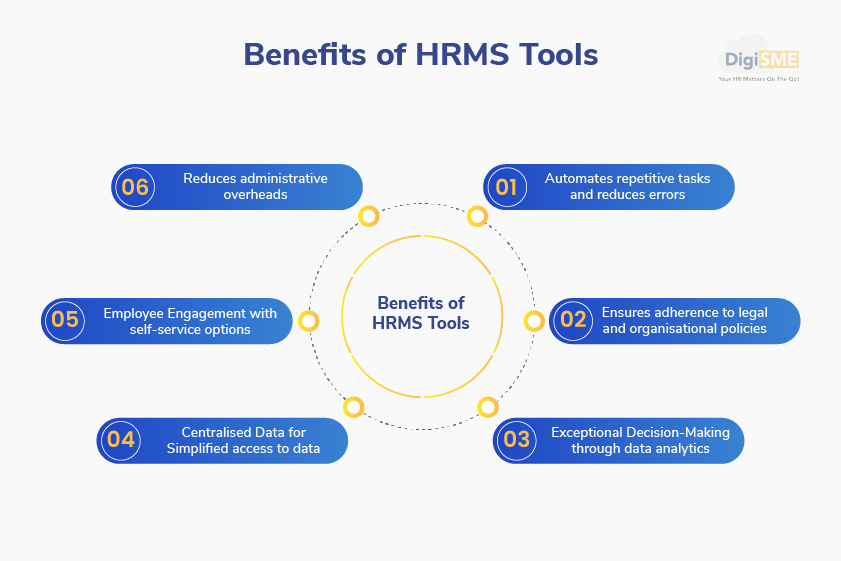
HRMS tools, also known as Human Resource Management Systems, help businesses manage and automate essential workforce processes. These HRMS software solutions streamline HR processes, reduce manual effort, and ensure compliance with labour laws. By automating routine tasks like payroll, attendance, and performance management, HRMS tools free up valuable time for HR teams to focus on strategic initiatives. This leads to improved employee engagement, better decision-making through data insights, and, ultimately, higher productivity for your business.
What Are HRMS Tools?
HRMS tools are software applications to manage human resources efficiently. Various HR functioHRMS tools are software solutions that help businesses manage their HR activities in one place. They bring tasks such as employee records, payroll, attendance, leave, recruitment, onboarding, and compliance together on a centralised platform, so HR teams don’t have to manage everything separately.
As a company grows, keeping track of all this information manually can quickly become difficult. An HRMS makes everyday work easier by giving HR teams and employees a simple way to access information, complete routine tasks, and keep employee records organised.
What Features Do HRMS Tools Include?
Employee Database Management:
It is a centralised repository for staff information, such as personal details, employment history, and documents. HRs and management teams can easily access the reports whenever necessary.
Payroll Management:
From salary calculations to tax deductions and statutory compliance, payroll handling will become effortless with technology. HR teams do not have to take a toll in evaluating the number of leaves taken, working hours, and other allowances/deductions before dispersing the salary on the last few days of the month.
Attendance and Leave Tracking
Working hours monitoring, leave request management and detailed report generation are all performed by technology in many organisations. Attendance management software has the necessary tools for effortless tracking of employee time-in/out, OT, early arrivals, and late comers.
Performance Management
Evaluating employee performance with technology reduces the work of supervisors and HR departments. Tools incorporate features such as goal setting, appraisal templates, multi-level feedback mechanisms, scorecards and more.
Recruitment and Onboarding
Applicant tracking systems are helpful in screening thousands of candidate applications. Onboarding, orientation, and other hiring workflows can utilise HRMS tools to provide exclusive onboarding for new hires.
Employee Self-Service Portal
With the employee self-service portal (ESS), companies are trying to provide staff with complete access to their data and allow them to perform tasks like applying for leaves, regularising attendance hours, and viewing payslips independently.
How to Use an HRMS Tool?
Research and Purchase
Search for the best HRMS tools available in the industry before purchase. An HR software vendor may offer onboarding, payroll and attendance, but another vendor can offer appraisal modules with claims reimbursement. It is crucial to analyse which is the best fit for the organisation.
Companies hiring field executives may consider investing in employee field tracking software that allows staff to mark their attendance when they are out of the office.
Setup and Customisation
Once the purchasing is done, it is important to configure the HRMS tool according to the organisational requirements. From company structure to HR policies, the tool should be curated to fit the firm’s workflows. HR software vendors with dedicated implementation teams will provide a complete walkthrough of the product and offer end-to-end support.
Data Migration
Every organisation will have workforce management systems, which can be traditional or technological. Transferring the employee data into the system is way too crucial. From personal details, working hours and other information must be moved to the new HR software.
Training
Unfamiliarity of new systems often result in failure of HR transformation in many organisations. If a firm is not aware of the HR software usage (both employees and employers), the management’s decision of digital transformation will go in vain. This is why setting and forgetting in HRMS is not considered ideal.
Read more! Why “Set it and Forget it” Doesn’t Work for HRMS
Automation
Once the system is up and running, all manual systems like attendance, payroll and performance evaluation can be automated.
Analytics and Reporting
It is not just about HR automation but using the HR data to make decisions. From monitoring trends to creating reports, it is easier for the management to analyse valuable insights like attendance patterns, staff who always arrive on time and more.
Continuous Support
Vendor support is significant for the efficient use of HR software. Providing updates and troubleshooting the issues are important aspects of any dedicated support team.
What Is the Difference Between HRMS and ERP?
HRMS software focuses on managing human resources and workforce processes, while ERP software manages multiple business operations, including HR, finance, inventory, and supply chain activities. Many large corporations prefer ERP systems, which include HRMS tools. However, small and medium-sized businesses prefer HR software with curated features suitable for their organisations and HR departments.
Things to Consider When Selecting HRMS Tools for Your Company
Scalability
Scalability is one of the essential attributes to consider when choosing HRMS tools. When an organisation grows, it is difficult to keep changing its systems. A reliable HRMS software is scalable allowing management to include new staff, upgrade workforce handling process and frequent software updates. There is no need to switch systems as the organisation evolves, saving time, money, and effort. For example, if a team grows from 50 to 500 employees, the tool should be capable of handling the increased load without any hindrance.
User-Friendliness
A user-friendly HRMS systems is crucial for efficient adoption and use across all levels of your organisation. The interface should be intuitive, minimising the learning curve for your HR team and employees. Features like easy navigation, clear dashboards, and self-service portals can make everyday tasks—like applying for leave or viewing payroll information—simple and efficient. A tool requiring extensive training or technical expertise might create delays and resistance among users.
Integration
One thing you should check is whether the HRMS works with the tools you already use. This could be your payroll software, accounting system, or project management tool. If the systems can share data, you won’t have to keep entering the same details in different places.
For instance, when the HRMS is connected to payroll, attendance and leave details can be used for salary calculations. This cuts down the manual work and also helps avoid common data entry mistakes.
Cost
Don’t look at the subscription price alone when checking the cost of an HRMS. There may be other costs for setting it up, making changes, training your team, maintenance, or future upgrades.
It’s also worth checking how the pricing is worked out. Some tools charge for each user, while others have a fixed price. Look at what you are getting for the amount you pay and see if it makes sense for your business.
Security
HRMS tools handle sensitive employee data, including personal details, payroll information, and performance records. This may include personal details, salary information, and performance records. So, it’s important to know how the system keeps this information safe. Check for things like data encryption, multi-factor authentication, and support for data protection rules. A good level of security helps keep employee information safe and lowers the chances of a data breach.
Customisation
Not every company handles HR in the same way. You may have your own process for leave approvals, employee forms, or performance reviews. So, it helps to choose an HRMS that can be changed to suit the way your company works.
For example, you may want to set up a different approval process for leave or add your own points to performance reviews. Having these options means your team doesn’t have to change its whole process just to fit the software.
Wrapping Up
Picking an HRMS is not just about choosing a tool with more features. It should fit the way your business works. Check how well it connects with your existing tools, what it will really cost, how it protects employee data, and how much you can customise it. These points can help you decide whether the software is a good fit for your organisation.
If you’re looking for an HRMS built around the needs of your organisation, take a look at DigiSME HRMS software. Simply reach out to our customer support team to learn more about our HR software. By exploring the various software modules, choose the ideal people management system that best fits your organisation’s requirements.
Contact us for a free consultation to discuss your needs.
HRMS Tools Frequently Asked Questions
Is HRMS software suitable for small businesses?
Yes. Small businesses can use HRMS to manage employee records, attendance, leave, payroll, and other routine HR work. The key is to choose a system with features and pricing that match the size and needs of the business.
What is the difference between HRIS and HRMS?
HRIS mainly manages employee information and core HR processes. HRMS covers a broader range of HR functions, such as payroll, attendance, recruitment, performance, and employee management.
What are the 7 HR basics?
The seven basic HR functions generally include recruitment, onboarding, employee management, payroll, attendance and leave, performance management, and employee development.
How much does HRMS software cost in India?
HRMS pricing varies based on the number of employees, modules, integrations, and deployment model. Many providers use per-employee pricing, while some offer fixed plans or custom pricing.
